

How to Monitor a Factory Floor in Real Time
Real-time factory monitoring means having sensor data from machines, environment, and process parameters available within seconds, not hours. It starts with choosing the right sensors for your top failure modes, runs through an edge-to-cloud architecture that handles the data volume, and works only if the alert design respects your operators' attention.
1. What Real-Time Monitoring Actually Means on a Factory Floor
Real-time doesn't mean millisecond updates for everything. It means that the data latency is shorter than your response window. If a motor bearing takes 4 hours to progress from early warning to failure, a 5-minute data refresh is real-time enough. If a press overload can damage tooling in 500 milliseconds, you need PLC-level speed.
The phrase "real-time" gets used loosely, so let's pin it down. In factory monitoring, real-time means that the time between a physical event happening and a human seeing data about it is short enough to act before consequences escalate.
For a bearing failure that develops over hours, a 5-minute polling interval on vibration sensors gives you plenty of warning. For a hydraulic pressure spike that can destroy a cylinder seal in under a second, you need the PLC's own safety circuit handling the response, not a monitoring dashboard.
Most factory monitoring falls into three speed tiers:
- Safety-critical responses (milliseconds): handled by PLCs, safety relays, and hardwired interlocks. This tier isn't part of your monitoring platform. It's already built into the machine.
- Operational responses (seconds to minutes): machine faults, quality deviations, throughput drops. This is where your monitoring system lives. Data latency of 1-30 seconds is adequate for almost all operational decisions.
- Trend analysis (minutes to hours): energy consumption patterns, gradual degradation, environmental drift. A 5-15 minute aggregation window is fine and reduces data storage costs by 90% compared to second-level granularity.
The mistake most plants make is trying to get millisecond data on everything. That approach generates enormous data volumes, overwhelms storage, and doesn't improve decision-making. A single vibration sensor sampling at 25.6 kHz generates 2 GB of raw data per day [1]. Multiply that across 50 sensors and you have a data infrastructure problem, not a monitoring solution.
Practical real-time monitoring matches the data refresh rate to the response requirement for each parameter. Fast where it matters. Aggregated where it doesn't.
2. The Sensor Layer: What to Measure and Where
Start with your downtime and quality Pareto, not with a sensor catalog. The top 5 failure modes on your worst-performing line will tell you exactly what physical parameters to measure and where to put the sensors. Most lines need 20-40 monitoring points beyond the OEM-installed instrumentation.
A sensor vendor will happily sell you 500 sensors for your plant. Before you buy any, pull up your last 12 months of downtime and quality data. Sort by total impact (minutes lost plus scrap cost). The top 5-10 items on that list are your monitoring priorities.
For each top failure mode, ask: what physical parameter would have given us 15-30 minutes of warning before this event? That answer becomes your sensor spec.
Common failure modes and the sensors that catch them:
- Bearing failure on rotating equipment: vibration sensor (accelerometer) mounted on the bearing housing. Cost: $200-500 per point for wireless. Gives 2-8 weeks of early warning through vibration signature changes.
- Motor overheating: temperature sensor (RTD or thermocouple) on the winding or bearing. Many motors have unused RTD wells already installed by the OEM. Check before buying new sensors.
- Hydraulic system degradation: pressure sensors on supply and return lines, plus a particle counter on the fluid. Pressure differential across filters tells you filter condition without calendar-based changes.
- Air quality in the production area: particulate sensors for dust, VOC sensors for solvent-based processes. These affect both product quality and worker safety.
- Compressed air leaks: ultrasonic leak detectors or flow meters on branch lines. The average plant loses 20-30% of compressor output to leaks [2], and that waste shows up in energy bills and pressure drops during peak demand.
Placement matters as much as selection. A vibration sensor on the wrong side of a gearbox housing picks up structural noise instead of bearing signals. A temperature sensor in a ventilated cabinet reads ambient air, not component temperature. Work with your maintenance team on placement. They know where the failures actually occur.
3. Data Collection Architectures: Edge vs. Cloud
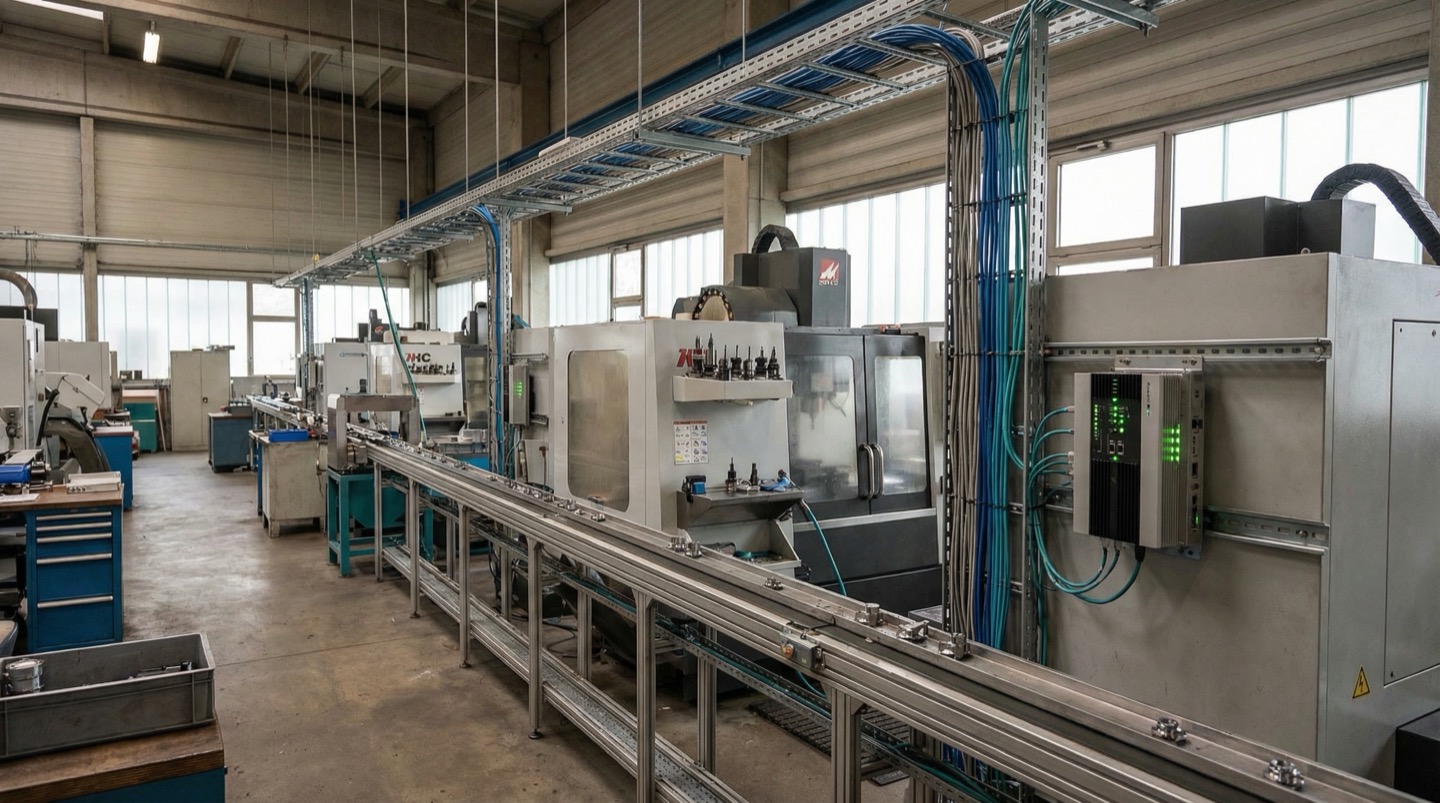
Edge computing processes sensor data locally on the factory floor before sending summaries to the cloud. This approach cuts bandwidth requirements by 80-95%, keeps latency under 1 second for local alerts, and avoids dependence on internet connectivity for critical monitoring.
Raw sensor data from a factory floor adds up fast. A mid-size plant with 100 monitoring points generating one reading per second produces 8.6 million data points per day. At a conservative 50 bytes per reading, that's 430 MB daily of raw data. High-frequency vibration data can multiply that by 100x.
Sending all of this raw data to the cloud is expensive and slow. More importantly, it creates a dependency on internet connectivity. If your plant's internet goes down, you lose monitoring at exactly the moment you might need it most.
Edge computing solves this with a simple architecture:
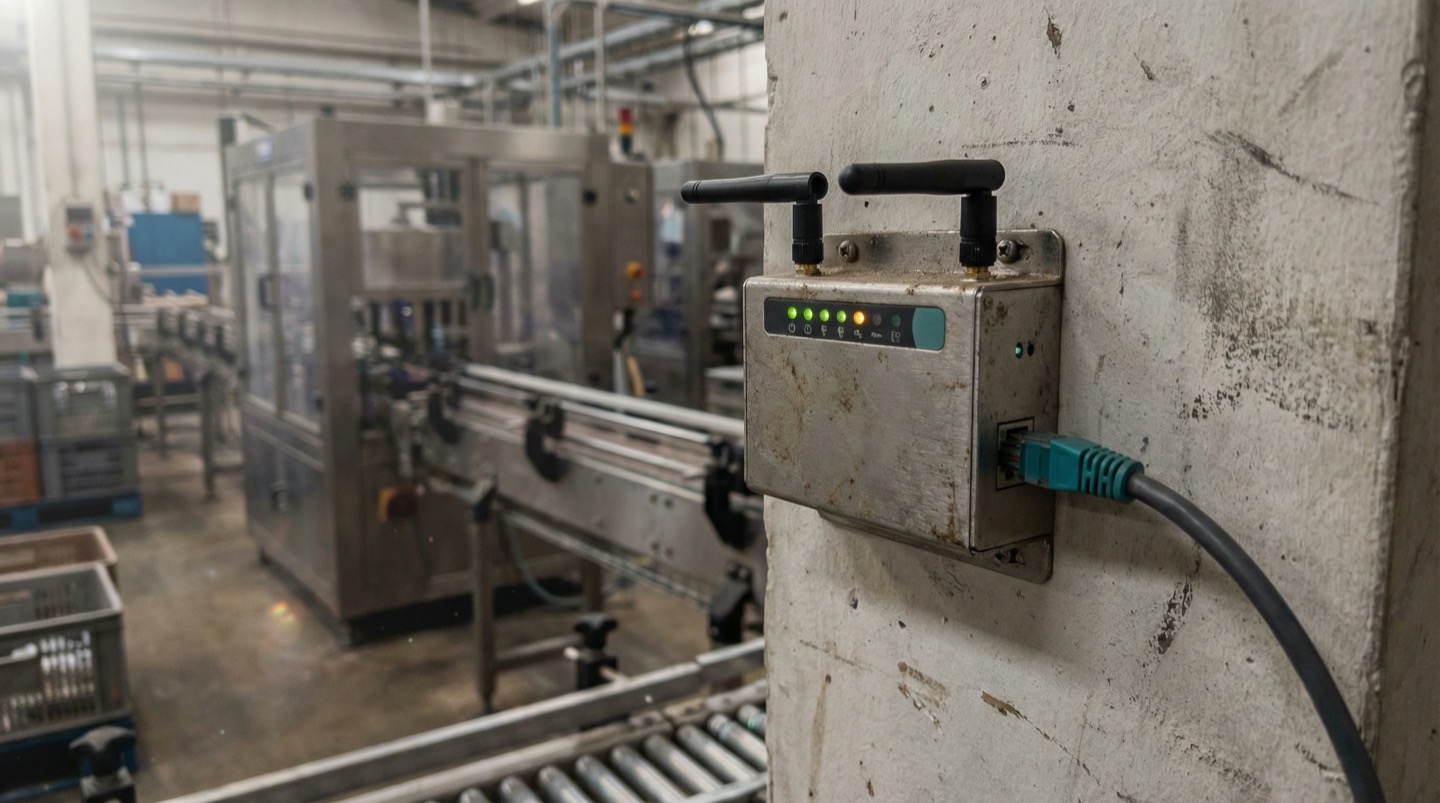
- Sensors connect to local edge gateways on the factory floor. These are small industrial computers (think Raspberry Pi-sized, but hardened for industrial environments) that cost $200-800 each.
- The edge gateway collects raw data from 10-50 sensors, runs local processing (averaging, threshold checking, FFT analysis on vibration data), and triggers local alerts within milliseconds.
- The gateway sends aggregated data to the cloud every 1-15 minutes: averages, min/max values, alarm events, and feature-extracted data (like vibration frequency peaks rather than raw waveforms). This reduces data volume by 80-95%.
- The cloud platform stores historical data, runs trend analysis, and provides dashboards accessible from anywhere.
This split architecture covers both needs. Local processing handles time-sensitive alerts without internet dependency. Cloud processing handles long-term trending and remote access.
Most modern industrial IoT platforms support this edge-cloud split natively. The main architectural decision is where to put the boundary between edge and cloud processing. A reasonable default: anything that requires a response in under 60 seconds runs at the edge. Anything that benefits from weeks of historical context runs in the cloud.
The edge gateway also handles protocol translation. Your 15-year-old machine speaks Modbus. Your new CNC speaks OPC-UA. Your wireless sensors speak MQTT. The edge gateway normalizes all of it into a consistent data format before sending it upstream [3].
4. From Flat Dashboards to Spatial Awareness
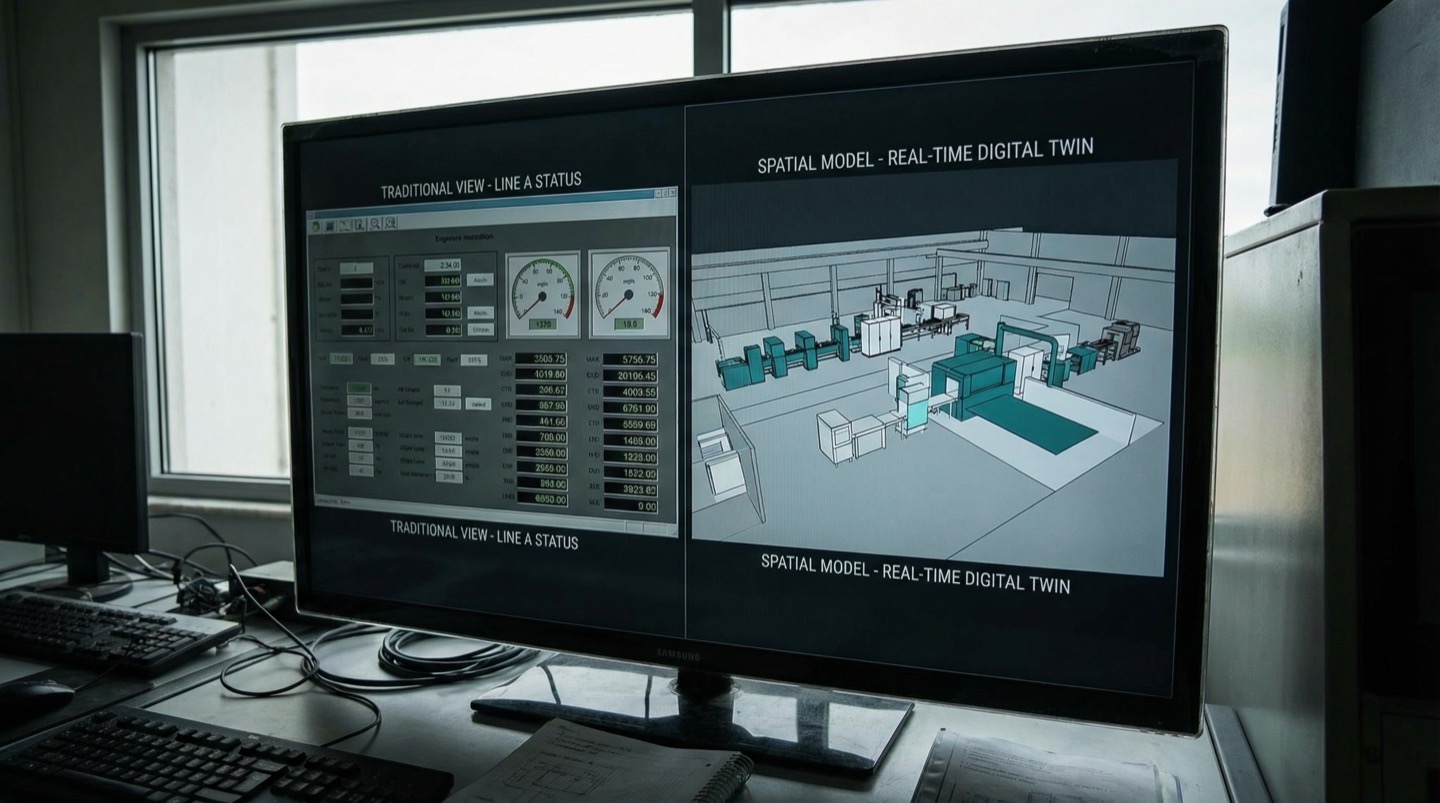
Traditional monitoring dashboards show data as lists and charts. You see that temperature sensor T-47 reads 82 degrees. What you don't see is where T-47 sits relative to the heat source, the ventilation duct, or the machine that's running hot nearby. Spatial monitoring maps data onto the physical floor plan.
Open a typical SCADA or monitoring dashboard and you'll see a grid of numbers, trend lines, and alarm indicators. The data is there, but the context is missing. You know motor 12 is running hot, but is motor 12 the one next to the steam line on the east wall, or the one in the clean room? You have to carry a mental model of the plant layout to make sense of the data.
This works when you have one person who knows the plant intimately. It breaks down with turnover, with night shifts, and with scale. When you go from monitoring one line to monitoring a full plant with 200+ data points, the flat dashboard becomes a wall of numbers.
Spatial monitoring takes a different approach. Sensor data gets plotted on a floor plan or 3D model of the facility. Each sensor appears at its physical location. Color coding shows status at a glance: green for normal, yellow for warning, red for alarm. You look at the southeast corner of the plant and immediately see that three sensors in that area are trending yellow.
The spatial view reveals patterns that table-based views hide:
- Thermal clusters: a group of machines in the same area all running 5-8 degrees above baseline. Not enough to alarm individually, but the cluster pattern points to an HVAC zone that's underperforming.
- Vibration propagation: a bad bearing on one machine transmitting vibration through the floor slab to adjacent machines, triggering false alarms on equipment that's actually healthy.
- Environmental gradients: humidity increasing from 45% to 65% across a 50-meter span because a door seal failed on the loading dock side of the building.
None of these patterns show up in a flat alarm list. They only become visible when data is anchored to physical space. The shift from time-series charts to spatial data views is one of the bigger practical improvements in factory monitoring over the past five years.
5. Alert Design That Doesn't Cause Alarm Fatigue
The average factory operator sees 300+ alerts per shift [4]. Most are nuisance alarms that get acknowledged and ignored. When a real problem occurs, it's buried in noise. Effective alert design means fewer, more meaningful notifications with clear severity, cause, and recommended action.
Alarm fatigue is one of the least-discussed and most damaging problems in factory monitoring. It's not a technology problem. It's a design problem.
Here's what typically happens. A monitoring system gets installed. The integrator sets conservative thresholds because nobody wants to miss an event. Every threshold violation generates an alarm. Within a month, operators are seeing hundreds of alerts per shift. They start acknowledging them without reading them. Six months later, a critical bearing failure alarm gets acknowledged and ignored because it looks identical to the 50 nuisance alarms that preceded it.
The ISA-18.2 alarm management standard provides a framework for fixing this. The target is fewer than one alarm per operator per 10 minutes during normal operation. Most plants run 5-10x above that.
Practical steps to reduce alarm noise:
- Deadband tuning: if a temperature oscillates between 79 and 81 degrees around an 80-degree setpoint, don't alarm on every crossing. Add a 2-degree deadband so the alarm only triggers at 82 and clears at 78.
- Time delay: require a condition to persist for 30-60 seconds before triggering an alert. This eliminates transient spikes that resolve on their own.
- Severity tiering: use three levels, not five. Information (log it, don't notify), warning (notify the operator, no immediate action required), critical (immediate action required, notify maintenance). If you can't clearly define the expected response for an alarm, it shouldn't be an alarm.
- Contextual grouping: when a conveyor drive trips, don't generate separate alarms for motor current, speed, and downstream starving. Group them as one event: "Line 3 conveyor drive trip" with the contributing data points listed in the detail view.
Review your alarm log monthly. Any alarm that fires more than once per day and never results in an action should be re-evaluated. Either raise the threshold, add a deadband, or reclassify it as an information-only event.
6. Environmental Monitoring People Forget
Temperature, humidity, air quality, and compressed air pressure affect product quality and equipment life, but they rarely show up in the initial monitoring plan. A 5-degree temperature shift in a machining area can cause dimensional drift that exceeds tolerance, and nobody connects it because the CNC doesn't have an ambient temp sensor.
Machine monitoring gets all the attention. Environmental monitoring gets forgotten until something goes wrong.
Consider a CNC machining center holding tolerances of plus or minus 10 microns. The machine is perfectly capable, but the shop temperature swings from 18 degrees C at 6 AM to 27 degrees C by 2 PM as the sun hits the west wall and 30 machines warm up the space. Steel expands at roughly 11.7 microns per meter per degree C. On a 500mm workpiece, a 9-degree temperature swing causes 52 microns of thermal expansion. That's five times the tolerance band.
The scrap rate goes up in the afternoon, and nobody connects it to temperature because the CNC reports tool wear, spindle load, and cycle time, but not the ambient conditions around it.
Environmental parameters worth monitoring in most factories:
- Ambient temperature: at least one sensor per 500 square meters, more in areas with significant heat sources or HVAC zones. Position sensors at work height, not at the ceiling where it's always warmer.
- Relative humidity: critical in electronics assembly (ESD risk above 60%), food processing (microbial growth above 65%), and any operation with powder handling (flow properties change with moisture).
- Compressed air pressure: a plant-wide supply pressure drop from 6.5 bar to 5.8 bar causes pneumatic cylinders to cycle slower, which shows up as unexplained throughput drops. Install pressure sensors on branch lines at the point of use, not just at the compressor.
- Particulate levels: relevant in painting, coating, and clean-room-adjacent operations. A spike in airborne particles often correlates with a filter change that's overdue or a door left open.
Environmental sensors are cheap. A wireless temperature/humidity sensor costs $50-150 [5]. The cost of not monitoring is dimensional drift, quality escapes, and equipment degradation that gets blamed on the machines when the building is the real variable.
7. Scaling from One Line to the Full Plant
Start on the line with the worst performance data, not the newest equipment. Prove the monitoring approach works, document the ROI from the first line, and use those numbers to justify expanding. Most plants go from first sensor to full-plant coverage in 6-12 months.
The temptation is to build a comprehensive monitoring plan for the entire plant before installing the first sensor. Resist it. Comprehensive plans take months to develop, require budget approvals that stall, and deliver value only when everything is connected.
Instead, start small and fast. Pick the line with the worst downtime or quality numbers. That line has the highest return on monitoring investment and the most motivated stakeholders.
Week 1-2: Install 10-20 sensors on the top 5 failure points of that line. Connect them to an edge gateway. Set up basic dashboards and 5-10 meaningful alerts.
Week 3-4: Tune alert thresholds based on actual operating data. Eliminate nuisance alarms. Validate that sensor readings match physical conditions. Get operator feedback.
Month 2-3: Measure results. How many unplanned stops were predicted or caught earlier? What was the actual response time improvement? Calculate the avoided downtime in hours and dollars.
Month 3+: Use those numbers to justify expanding to the next line. The conversation changes from "we think monitoring would help" to "monitoring on Line 4 prevented 12 hours of downtime last month, saving roughly $90,000. Here's the plan for Lines 5 and 6."
As you scale, two things change. First, you start seeing cross-line patterns: power quality issues affecting multiple lines, environmental conditions that correlate with quality problems across the plant, and shared resource constraints like compressed air or cooling water. These patterns are only visible with plant-wide data.
Second, the edge architecture starts paying for itself. Edge gateways that you deployed per-line can be consolidated. A single gateway often handles 50-100 sensors, so adding a second line to an existing gateway is a marginal cost of tags and wiring, not new infrastructure.
The plants that scale successfully share one habit: they treat monitoring as an operational tool, not an IT project. The maintenance and operations team owns it. IT provides infrastructure support. When monitoring lives in the IT department, it becomes a reporting tool that nobody on the floor trusts or uses.
The Spatial Turn in Factory Monitoring
The next evolution in factory monitoring isn't more sensors or faster data. It's spatial context. Digital twin platforms map every sensor, every machine, and every environmental zone onto a model of the physical facility. This makes cross-domain correlation automatic instead of manual.
For decades, factory monitoring has been organized by system: one platform for machine health, another for energy management, a third for environmental controls, maybe a fourth for quality data. Each system is good at its domain, but cross-domain correlation requires a human who knows all four systems and can mentally overlay the results.
Digital twin technology changes this by providing a shared spatial framework. When every data point has a physical location, the software can automatically correlate events that happen near each other in space and time. A quality excursion on Line 3 that coincides with a temperature spike in the same zone of the building gets flagged as potentially related, without anyone needing to manually cross-reference two separate dashboards.
This spatial approach is particularly useful for the environmental monitoring gaps described earlier. When ambient temperature data is mapped onto the floor plan alongside machine performance data, the correlation between afternoon thermal expansion and dimensional drift becomes visually obvious. The data was always there in separate systems. The spatial context makes the connection.
Plants adopting spatial monitoring report that new operators reach effective troubleshooting capability 40-50% faster compared to plants using traditional dashboard-based systems. The floor plan view provides an intuitive mental model that doesn't require months of accumulated plant knowledge.
The practical barrier has dropped significantly. Where building a digital twin of a factory used to require specialized 3D modeling skills and months of work, current platforms can ingest a 2D floor plan, auto-place sensors based on coordinate data, and have a functional spatial view running within days. The entry point is a floor plan file and a list of sensor locations.
Frequently Asked Questions
How many sensors do I need to monitor a factory floor effectively?
There's no universal number. Start from your failure and quality data, not from a sensor catalog. Identify the top 10 causes of downtime and quality loss by total impact. For each one, determine what physical measurement would provide early warning. That gives you your sensor list. A typical mid-size production line needs 20-40 monitoring points beyond OEM-installed instrumentation. For a 5-line plant, that's 100-200 total sensors.
What's the difference between edge computing and cloud-only monitoring?
Edge computing processes data on a local device at the factory before sending it to the cloud. This means alerts fire in under a second even without internet connectivity, data volume sent to the cloud drops 80-95%, and critical monitoring continues during internet outages. Cloud-only systems send all raw data to remote servers for processing, which adds 2-10 seconds of latency, depends on reliable internet, and generates higher bandwidth costs.
How do I reduce alarm fatigue in my plant?
Start by auditing your current alarm log. Count how many alarms per shift each operator sees. If it's more than 6 per hour during normal operation, you have a design problem. Add deadbands to oscillating signals, require persistence times of 30-60 seconds before alerting, group related alarms into single events, and classify every alarm into three tiers: information, warning, and critical. Review monthly and suppress any alarm that fires daily without ever resulting in corrective action.
What's a realistic budget for monitoring a single production line?
For a typical discrete manufacturing line, expect $8,000-25,000 for the first line including sensors (20-40 points at $200-500 each), an edge gateway ($400-800), installation labor, and software subscription for the first year. The cost per line decreases as you scale because gateway and infrastructure costs are shared. Most plants see ROI within 2-4 months from reduced unplanned downtime on the monitored line.
Related Resources
Manufacturing Downtime Cost Calculator
Calculate the true cost of unplanned downtime across your production lines. Includes lost revenue, labor waste, and scrap costs. Free, instant results.
Learn more →ComparisonDigital Twin vs SCADA
A practical comparison of SCADA and digital twin platforms for manufacturing. Covers data models, visualization, alerting, and deployment trade-offs.
Learn more →ComparisonDigital Twin vs MES
A practical comparison of MES and digital twin platforms for manufacturing. Covers ISA-95 levels, OEE tracking, production traceability, and how the two systems complement each other.
Learn more →ComparisonDigital Twin vs Dashboards
How industrial dashboards and digital twins compare on data visualization, troubleshooting, and cross-system monitoring. Covers Grafana, Power BI, and spatial alternatives.
Learn more →SolutionUnplanned Downtime Prevention
Most manufacturers discover downtime after it costs them. Sandhed gives you the visibility to catch equipment issues before they shut down production.
Learn more →SolutionMaintenance Management
Maintenance teams lose hours tracking down service records, chasing overdue tasks, and figuring out what was done last time. Sandhed puts every work order, service record, and maintenance schedule on your 3D floor plan where you can see it.
Learn more →AnswerHow to Get Real-Time Machine Data Without a 6-Month Integration Project
Traditional machine data integration projects take 4-6 months because they try to connect every system to every other system. The faster approach is read-only data collection through edge gateways that translate machine protocols into a common format without modifying the machine controllers. You can go from zero to first data point in days, not months.
Learn more →AnswerWhy Does My Production Line Keep Stopping?
Most unplanned stops come from a short list of causes that compound each other. Sensor blind spots, delayed maintenance response, equipment running past rated cycles, power quality events, raw material drift, PLC faults, and shift-change errors account for the majority of lost production time. Fixing them requires data correlation, not more dashboards.
Learn more →Sources
- NIST — Smart Manufacturing Systems Design and Analysis Program
- U.S. Department of Energy — Compressed Air Systems: Leak Detection and Energy Waste
- Industrial Internet Consortium — Edge Computing Architecture for Manufacturing
- ISA (International Society of Automation) — ISA-18.2 Alarm Management Standard: Operator Alert Benchmarks
- Plant Engineering Magazine — 2024 Sensor Cost Survey: Wireless Monitoring Hardware Pricing Trends
Map Your Factory Floor Data Spatially
See how sensor data looks when it's plotted on your actual floor plan instead of buried in spreadsheets. Walk through a setup with your own layout.